Appointment software for clinics: how Axon works
How someone books on your clinic's website with Axon: services, calendar, reminders, waiting list and assistant. The clinical side belongs to Atlas.
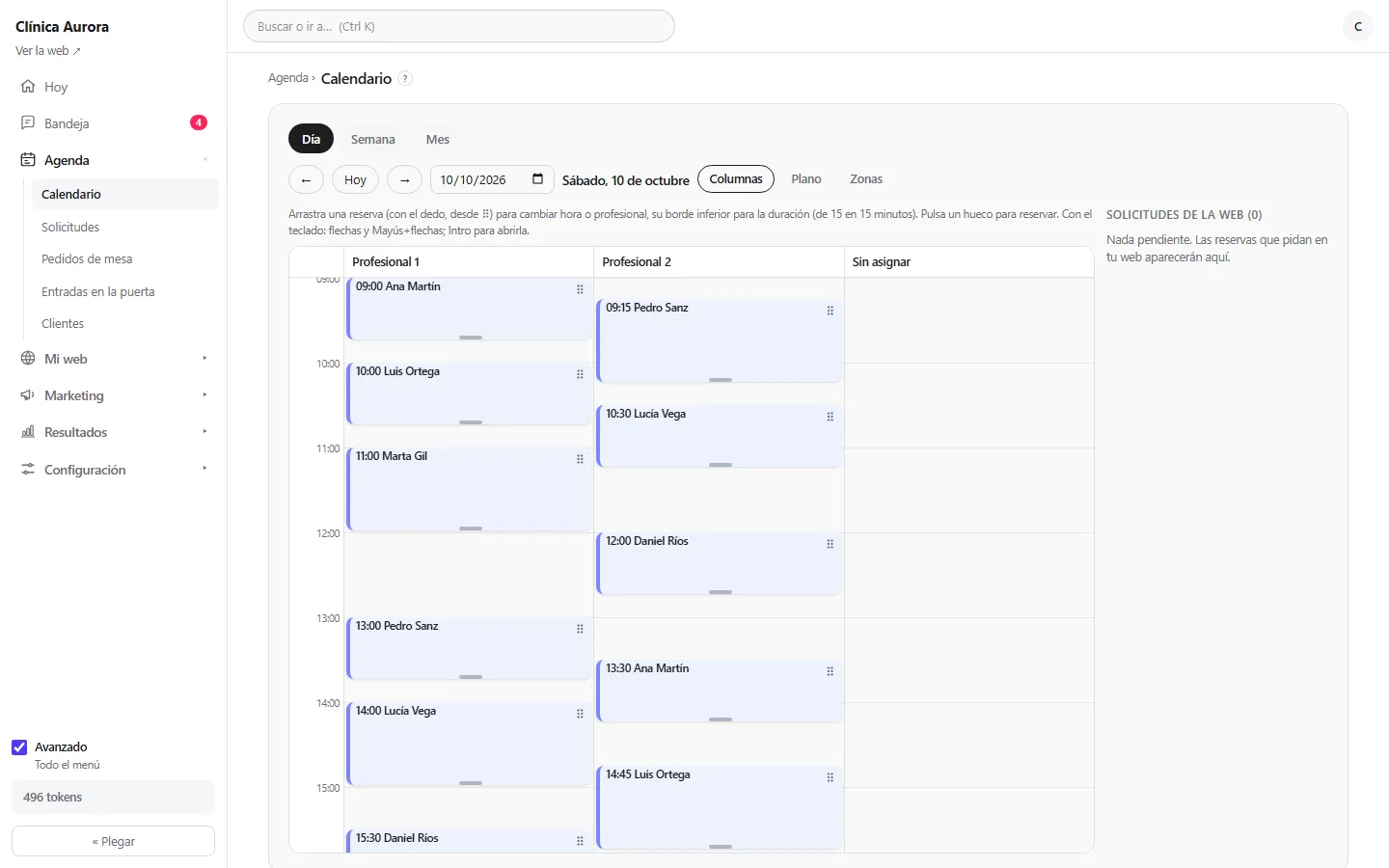
If you are looking for appointment software for clinics, it helps to separate two things: booking and caring. Axon handles the first one, which means the website, the calendar and the messages. Clinical records and clinical data about people belong to Atlas, a different product. This guide explains what Axon does in a clinic, step by step.
What a clinic needs from its calendar
A clinic has services of different lengths, professionals with their own hours and people who phone at the busiest time. Axon's calendar works with that: every service has its duration and its professional, every team member has their own hours, and public holidays are marked once for everyone.
If the clinic has more than one location, each one carries its own address and hours, and the website, the assistant and the appointment page use those of the right location. A day with no free time is not offered, and the calendar never gives the same slot twice.
How someone books
They open your website, choose the service, see the days with free slots and pick a time. They leave a name, email and phone number, accept the privacy information and get a confirmation. It all happens without a call and at any hour.
Every appointment has its own page, with the date, the time and buttons to move or cancel it. The link arrives by email, and changing the appointment from there frees the slot for someone else. You see the appointment straight away in the panel, under Agenda.
Reminders and deposits
The email reminder goes out one day before by default, and you can add a second one. If you switch on SMS, the reminder also reaches people who left a phone number. With Axon Bot, the reminder can go out on WhatsApp with a template approved by Meta, only to people who agreed to it.
If you want to avoid no-shows, you can ask for a deposit when booking. It is charged in your own Stripe account, the server works out the amount and not the browser, and you decide service by service.
When someone does not come, you mark the appointment as «No show». The client record counts the no-shows and you decide what happens to people with several: nothing, their booking becomes a request you confirm, or they can no longer book online.
Waiting list
If a day has no free time, the website offers «Tell me if a slot frees up». When an appointment is cancelled, the people on the list get an email with a link to that day's calendar. The slot is not held for anyone: whoever arrives first takes it. In the panel you see who is waiting and can book them in yourself.
The assistant
The assistant answers in the website chat, and on WhatsApp with Axon Bot. It replies with the data from your website: hours, services, address, how to get there. It says it is an AI, does not invent prices or hours and, if it does not know something, alerts your team, who see the conversation in the inbox.
It can look at free slots and propose an appointment, but it is only booked once the person presses Confirm. It gives no medical advice and does not assess symptoms: for a clinical question it hands over to your team.

What Axon does not do
Axon does not store medical records, diagnoses or consent forms, and it does not ask you to write health data in the notes or in the booking questions. If you need clinical records, tests, treatments and billing for a clinic, that is Atlas, and Axon's booking can live alongside it. Atlas does not replace your adviser or your data protection officer.
Several locations and several professionals
If your clinic has more than one location, each carries its own address, phone number and hours, and the professionals you assign to it. With two or more locations, the website asks for the location before offering the time and only shows that location's hours and people; the chat asks too. In the panel, the day and the week can be seen per location.
Each professional can have their own calendar in ICS format: a secret address they subscribe to from Google, Apple or Outlook that carries only the service and the first name, never a phone number or email. If you change the address, the previous one stops working.
Common questions
- Can I offer video appointments? Yes: a service can include a Google Meet video call (with Google Calendar connected; otherwise a Jitsi room), which arrives in the confirmation.
- What do I ask when booking? Name, email and phone number, plus any questions you add about organising the appointment. Do not ask for health data: Axon is not built to keep it.
- What if the person cannot come? They change or cancel from their appointment page, within the notice you set, and the slot is freed.
- Who answers if the assistant does not know? Your team, from the inbox, within your hours.
How to start
You choose the "Clinic / medical centre" sector, the website is born with a structure and sample services, and you change them from the panel: texts, photos, services, hours and professionals. What you do not use, you switch off. Request a demo and we will show you your website with your services and hours, and check the plans under Pricing.