Website for renovation companies: how Axon works
How Axon works for a renovation company: a website with real jobs and process, visits by appointment for quotes, an out-of-hours assistant and invoices.

A website for renovation companies has to do something hard: get a stranger to trust you without having seen you work. You do it by showing real jobs, explaining the process and making it easy to ask for a visit. Axon gives you the website, the calendar for visits, an out-of-hours assistant and invoices. This guide goes through it step by step.
A website that convinces with real jobs
Your website is born with the structure people planning a renovation look for: services (bathrooms, kitchens, full refurbishments), the process in steps, a before-and-after gallery, the team, frequently asked questions and a form to ask for a quote. The photos and texts are yours and you change them from the panel.
One rule: Axon does not invent jobs, clients, reviews or figures. What you cannot stand behind, you leave switched off, and what you add by hand is yours. A gallery of your own work is worth more than any sentence.
The website is in Spanish, English and Catalan, each language with its own address, and it can be found in search engines with a title and description per page.
The process, in plain view
A steps section explains what a job looks like: the visit, the quote, planning, the work and the handover. You do not need to promise specific deadlines; it helps the client know what comes next and lose the fear of starting. Frequently asked questions (permits, duration, what happens with the dust, who coordinates the trades) remove calls before they are made.
Visits by appointment
To measure or quote, the client books a visit in the calendar. You define the service (a quote visit, say) with its duration and who does it. They choose day and time among the free slots, leave their contact details and their address or whatever you ask in the booking questions, and get a confirmation. It has its own page, where they can move or cancel it.
If you use Google Calendar or Outlook, the visit appears there and what you already have blocks those hours, so a visit and a job never overlap. The reminder goes out one day before by default by email, and you can add another; with SMS or with Axon Bot on WhatsApp, to people who agreed. That way nobody turns up in vain.
The out-of-hours assistant
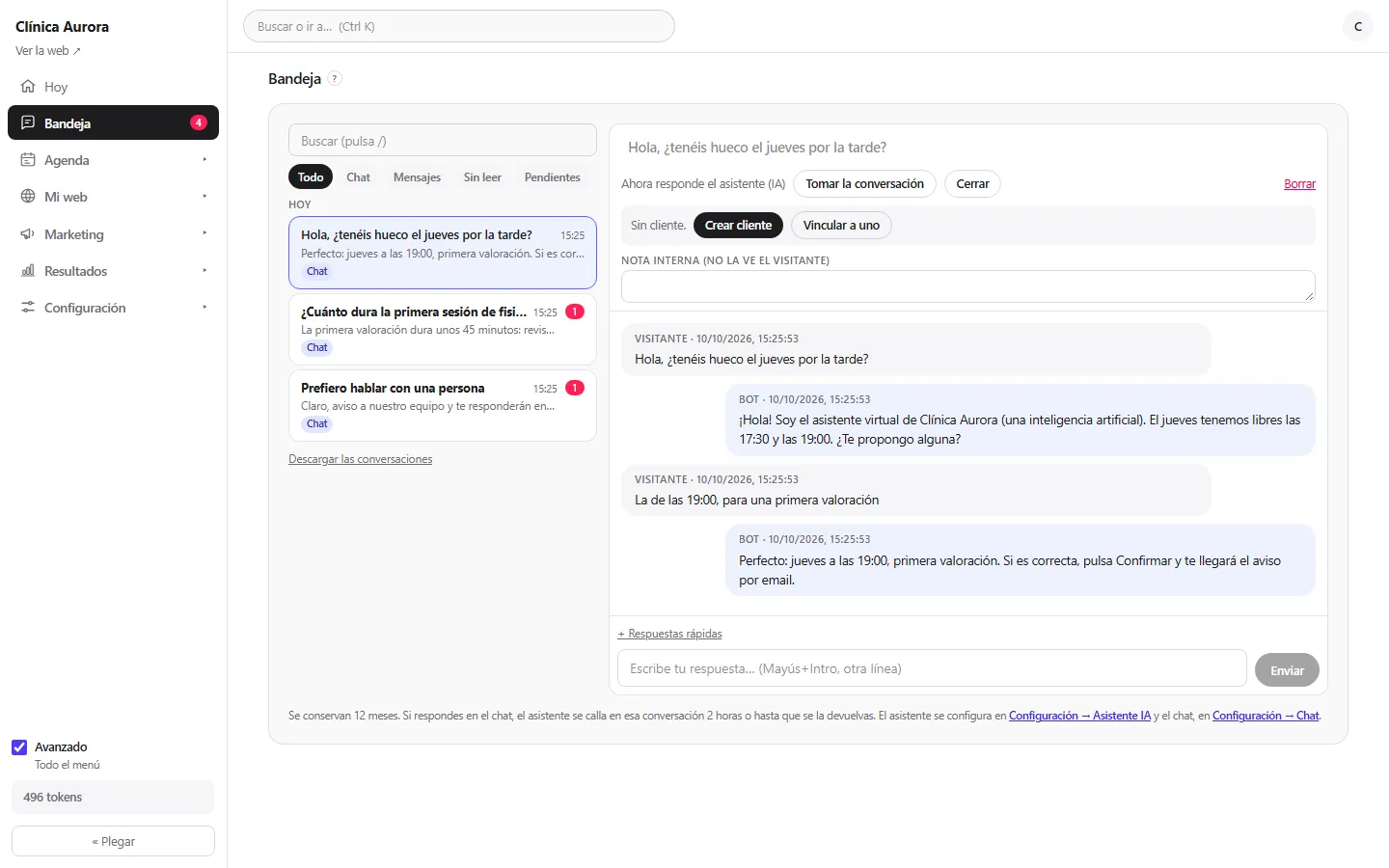
People ask for quotes at night or at weekends. The assistant looks after your website chat and, with Axon Bot, your WhatsApp. It answers with the data you have published: which renovations you do, which area you cover, how to ask for a visit. It says it is an AI, does not invent prices or deadlines and collects what your team needs to know: what they want to renovate and how to reach them.
It can propose a visit, which is only booked once the person presses Confirm. If it does not know something, it alerts your team in the inbox.
Quotes and invoices
When a visit turns into a job, you issue the quote from the panel with your tax details and turn it into an invoice once. Invoices carry your own series, gap-free numbering and PDF; you can send them by email, schedule recurring ones and send payment reminders. An issued invoice is not altered: it is corrected with a credit note.
For a job paid in stages, you can issue one invoice per milestone.
Follow-up and reviews
After a visit or a job, Axon can ask for a review with your company's Google link, at most once every 180 days per client. Each follow-up is switched off, left as a task for your team or sent automatically, and only to people who agreed to receive messages.
Common questions
- Can I change the gallery myself? Yes, from the panel, with your own photos.
- Can I connect my own domain? Yes, with your own verified domain.
- Does the website work on a phone? Yes: it adapts to any screen.
Data and privacy
Your website's forms carry the basic data protection information and the acceptance box, and the cookie notice gives equal weight to accept all, reject all and configure. Visit measurement is not switched on without consent. Axon includes tools to export or delete a person's data. None of this replaces your adviser.
Photos and documents
Photos of each job are optimised when uploaded (WebP in several sizes, no EXIF data) and each carries its alternative text. If you have a company brochure, a finishes table or a catalogue, you upload it as a PDF and it becomes available on the website and for the assistant to answer from its content.
How to start
You choose the "Renovations / local services" sector, the website is born with sample services and texts, and you change them from the panel. Request a demo and we will show you your website, and see the plans under Pricing.